Getting paid: choosing your payment methods
The six ways shoppers can pay you, what each one needs from you, and the checkout rules that decide which ones work with pickup, delivery and shipping.
Every order needs a way for the money to reach you. Until at least one payment method is switched on, your store can't open for orders. It all lives on one page: Payments.
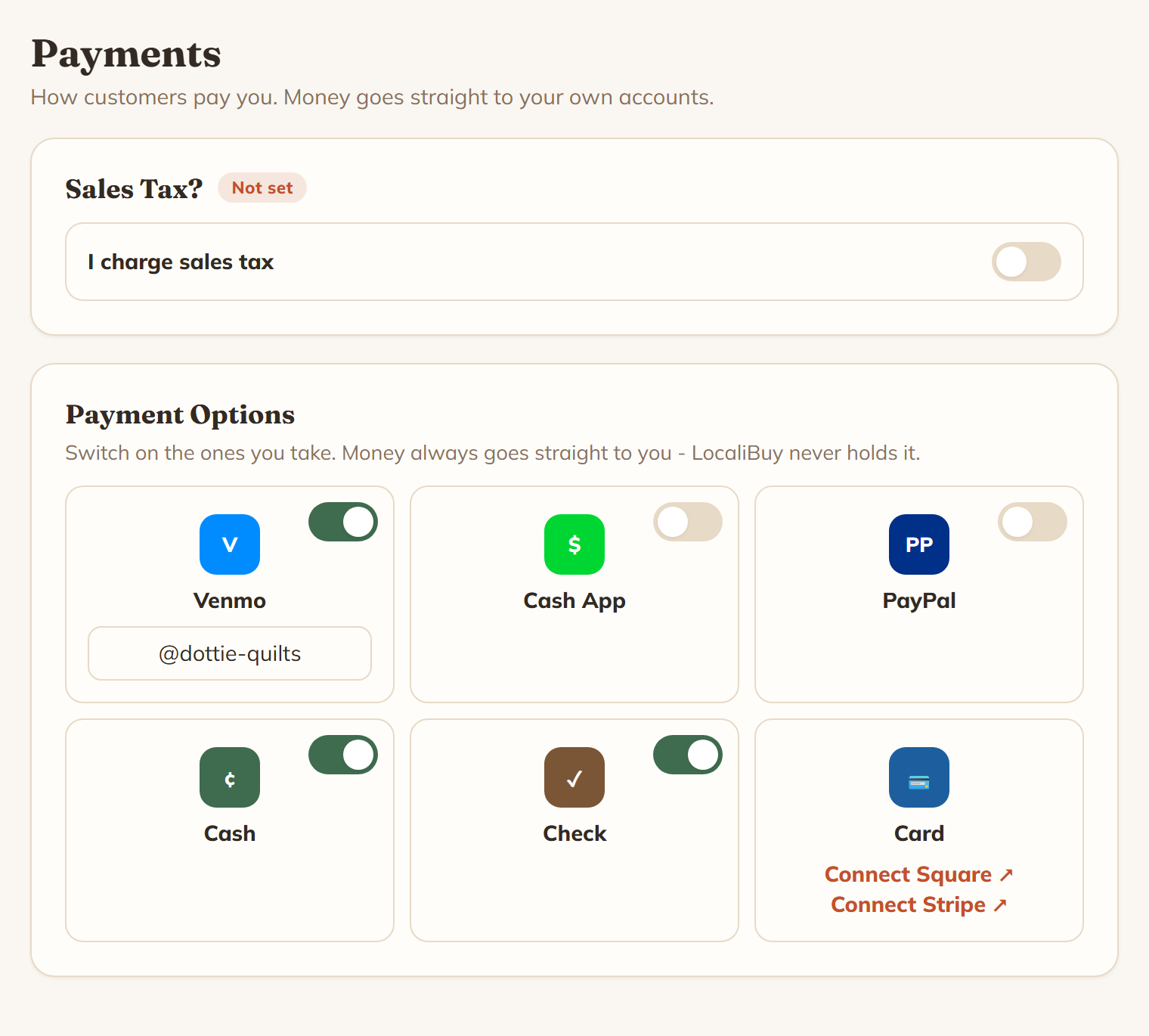
Whatever you pick, the money lands in your own accounts. The page says it plainly: "Switch on the ones you take. Money always goes straight to you - LocaliBuy never holds it."
The six options
Three of them are just a handle you type in. Flip the switch on the tile and a box appears for it.
- Venmo. Your handle, like the example @your-handle. Your buyer gets a button that opens Venmo with the amount and the order number already filled in.
- Cash App. Your cashtag, like $yourcashtag. The amount is filled in for them, but Cash App won't carry a note.
- PayPal. A paypal.me/yourname address is best, because that gives the buyer a one-tap button. An email address still works, it just doesn't make a button.
Two are switches with nothing to type:
- Cash. The buyer is told to have the money ready at pickup or delivery.
- Check. The buyer is told you'll say who to make it out to.
Card is a different animal. There's no switch on it, because the connection is the switch. Hit Connect Square or Connect Stripe and sign in to your own account. Once it's connected the tile reads "Card, Google Pay and Apple Pay at checkout, straight to your Square." Shoppers just see it as "Credit card". If Square connects but the tile warns "No Square location found - reconnect or add a location in Square", card isn't working yet, so sort that out.
Rules the checkout enforces
Two of these will catch people out.
Cash and check are in-person only. As soon as a shopper picks shipping, those two disappear from their choices. If an order somehow tries it anyway, checkout stops with "Cash and check are not available for shipped orders."
Shipping needs Square. A parcel goes to somebody you never meet, so there's no paying on the doorstep. Checkout refuses a shipped order unless your shop has Square connected with a location, and the shopper is told "This shop is not set up for shipping right now. Please choose pickup or local delivery, or contact the maker." The shipping switch on Delivery Options says the same thing before you get that far: "Connect Square before you turn on shipping."
And the obvious one: a shopper can only pick something you've actually filled in. Turn a handle off, or leave the box empty, and it's simply not offered.
How this unlocks opening for orders
Your setup board has a required step called Payments & Tax. Until you set something it reads "Not set up yet", and that alone keeps the Open for orders switch shut. Two things tick it off: at least one payment method, and the sales tax question answered. Answering "no" is a perfectly good answer, it just has to be answered, because it's your liability and we won't guess for you. The step counts Venmo, Cash App, PayPal, Cash, Check and a connected Square.
Picking a sensible starting set
You don't need all six. A good pickup-and-local-delivery shop can run on Cash plus one app you already use. That takes about a minute and gets you open.
Then think about it this way:
- Selling at pickup and local delivery only? Cash plus Venmo or Cash App covers nearly everybody.
- Want to ship? You need Square. Nothing else will do it.
- Want people who don't use payment apps to be able to buy? That's Card.
Every method you add is one more shopper who doesn't have to give up at the last screen. Every one you leave off is fine too, as long as one is on.