Opening for orders: the last step
Being listed in the directory and being open for orders are two different switches; here is what the second one needs and what it changes.
Your page has two levels, and they switch on separately. Directory listing puts you in the directory so neighbors can find you and get in touch. My shop is the one that opens your store, so people can actually check out. A lot of makers finish the whole setup and never flip that second one. Here is how it works.
Where the switch is
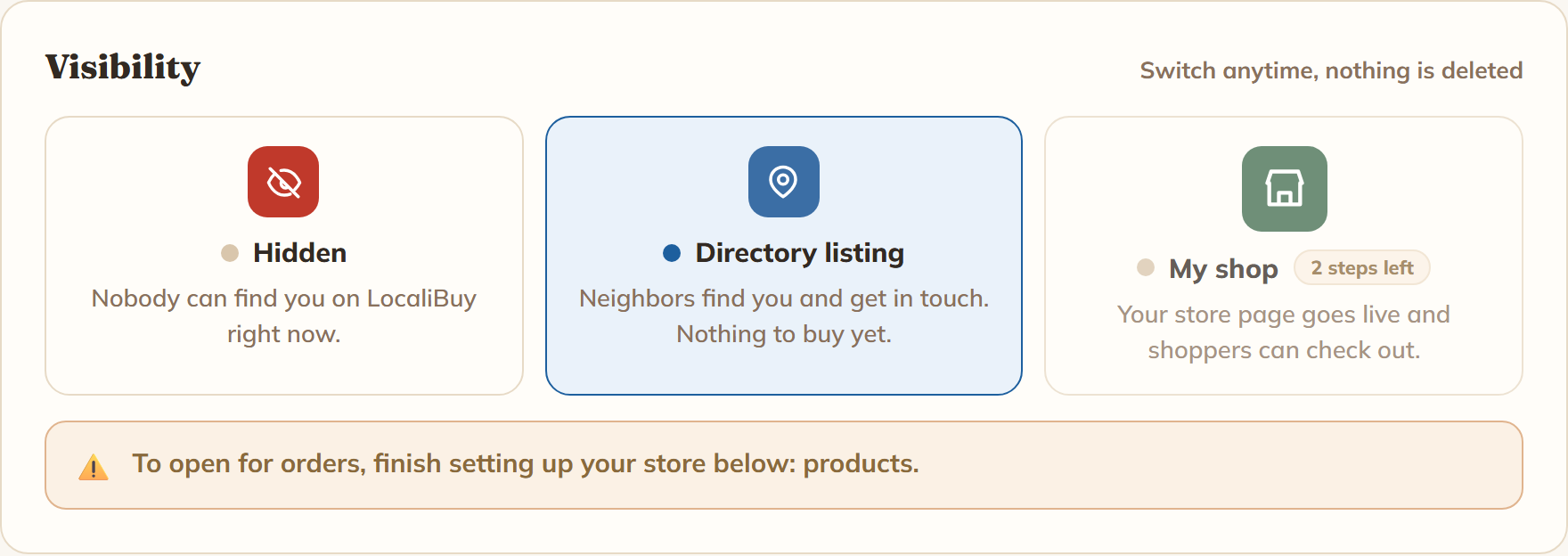
Go to My Shop. The first card on the page is Visibility, with three choices: Hidden, Directory listing and My shop. Tap My shop, confirm, and you are open.
What has to be done first
Every tile under the Required to Open heading has to be ticked. They are all on the same board:
- Basics, Branding, Contact & Socials, Photos of Your Work and About the Maker. If your directory listing is finished, these are already done. Branding and About the Maker also count as answered if you deliberately skip them.
- Payments & Tax. At least one way to be paid, plus the sales tax question answered. "I don't charge tax" is a real answer and it counts. Never having been asked does not.
- Delivery Options. Pickup, local delivery or shipping, at least one of them. Shipping only counts here once you have connected Square for card payments, because a posted order cannot be paid in cash.
- Products. At least one product live on your site.
- Store Template. Pick a look. One click does it, and you can change it later.
- One small box per section of the template you picked, grouped under Your Page. Saving a section counts, even if you keep the suggested words. So does hiding a section you don't want.
- Final Look. Read your whole page through once and say it looks good.
Everything under Settings & Tools is optional and never blocks you: Categories, Product Options, Subscribers, Custom Domain, the QR code, the SEO check.
If you tap it too early
Nothing breaks, and nothing is hidden from you. The My shop option carries a small chip counting what is left, like 2 steps left. Tap it anyway and an amber note appears naming the next thing to fix, for example "To open for orders, finish setting up your store below: products." Go finish that one, then come back. The bar at the top of Setup Progress shows how far along you are.
When the last one is ticked, that card reads Ready to open, and the My shop option glows once to tell you.
What changes for shoppers
Until you open, anyone visiting your link sees your directory profile: who you are, your photos, and how to reach you. There is no cart. You will see your store when you visit, because you are the owner, with a bar at the top that reads "Preview - only you can see your store." That bar is the giveaway.
The moment you switch to My shop:
- Your store page goes live for everyone, with products, a cart and checkout.
- Your card in the directory starts showing your delivery labels: Pickup, Delivery, Ships.
- If you ship, your shop becomes eligible for the Makers who ship row on the LocaliBuy home page.
- A bar appears at the top of My Shop reading "Your shop is live", with your link and a Copy link button ready to paste into a post.
Can you switch it back off?
Yes, any time. The Visibility card says so right at the top: "Switch anytime, nothing is deleted." Going back to Directory listing asks you to confirm and tells you exactly what will happen: "Your listing stays live so neighbors can still find and contact you, but the cart and checkout come off your page. Your products and settings are kept."
Hidden takes the whole page down, listing and all. Either way, orders you already have are unaffected.
If you just need a break for a weekend show or a holiday, you don't have to close the store. Use the Time Away tile under Settings & Tools instead.